IPTV Provider for TiviMate: Best Options [2026]
Best Options in 2026
TiviMate is the most powerful IPTV player on Android, Firestick, and Android TV — but only if your provider delivers clean EPG data, reliable catch-up, and fast playlist loading. This guide covers which providers work best with TiviMate plus a full setup walkthrough.
Finding the right IPTV provider for TiviMate is the difference between a smooth, cable-like viewing experience and constant frustration with missing channels and broken guides. TiviMate relies on accurate M3U playlists and Xtream Codes API connections to deliver its signature features — multi-screen PIP, 7-day catch-up, and a real electronic program guide. Provider IPTV is built to deliver exactly that, but this guide will help you evaluate any provider for TiviMate compatibility before you commit.
Jump to: Why TiviMate · Compatibility checklist · Setup guide · EPG and catch-up · Advanced settings · FAQ
IPTV provider for TiviMate: why TiviMate is the top player
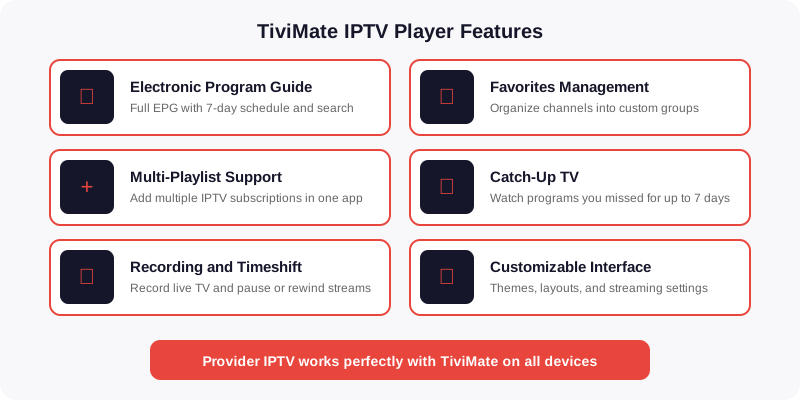
TiviMate has become the default IPTV player on Android-based devices for good reason. Compared to IPTV Smarters, GSE Smart IPTV, or Perfect Player, TiviMate offers a level of polish and feature depth that no competitor matches. Here is why it matters when choosing your IPTV provider:
- Multi-screen picture-in-picture — watch up to 9 channels simultaneously on a single screen. No other free or paid IPTV app offers this.
- Native EPG with 7-day timeline — TiviMate displays a full weekly program guide that looks and feels like cable TV. Providers with clean EPG data make this feature shine.
- Catch-up and recording — rewind and record live TV if your provider supports catch-up streams. This depends entirely on the IPTV provider, not TiviMate itself.
- Fast channel zapping — TiviMate pre-buffers the next channel, reducing switch time to under 2 seconds on a good provider.
- Favorites and custom groups — organize thousands of channels into personal folders. Essential when your provider delivers 50,000+ channels.
The table below compares TiviMate Free versus TiviMate Premium so you know which version you need:
| Feature | TiviMate Free | TiviMate Premium |
|---|---|---|
| Number of playlists | 1 | Unlimited |
| EPG support | Basic | Full 7-day guide |
| Catch-up / timeshift | No | Yes |
| Recording | No | Yes (local storage) |
| Multi-screen PIP | No | Up to 9 screens |
| Favorites and custom groups | Limited | Full |
| Auto-update playlists | No | Yes (scheduled) |
| Price | Free | $5.49/year |
For serious IPTV use, TiviMate Premium is strongly recommended. The catch-up, recording, and multi-screen features are what set TiviMate apart from every other player — and all of them require Premium.
IPTV provider for TiviMate: what makes a provider compatible
Not every IPTV provider works well with TiviMate. The app relies on specific technical features that some providers support fully and others barely implement. Before subscribing to any IPTV service for use with TiviMate, verify these compatibility requirements:
| Requirement | Why it matters for TiviMate | Provider IPTV |
|---|---|---|
| Xtream Codes API | Enables auto-login, EPG sync, and catch-up without manual URL entry | Yes |
| M3U playlist URL | Alternative connection method — works for basic streaming | Yes |
| EPG / XMLTV feed | Populates the program guide with channel names, show times, descriptions | Yes |
| Catch-up streams | Allows rewinding live TV up to 7 days back | Yes |
| Multi-connection | Needed for PIP multi-screen — each screen is a separate connection | Yes |
| 4K / FHD streams | TiviMate supports hardware decoding for 4K — provider must serve 4K feeds | Yes |
| Anti-buffer servers | Reduces buffering during peak hours — critical for live sports on TiviMate | Yes |
Provider IPTV supports all seven requirements out of the box. Every subscription includes Xtream Codes credentials, a dedicated M3U link, full EPG data, and catch-up on supported channels — everything TiviMate needs to run at its best.
Best IPTV provider for TiviMate: setup guide
Setting up TiviMate with your IPTV provider takes less than 5 minutes. There are two connection methods: Xtream Codes API (recommended) and M3U URL. Here is how to do both.
Method 1: Xtream Codes API (recommended)
This is the best way to connect because it enables automatic EPG loading, catch-up, and cleaner channel organization.
- Install TiviMate from the Google Play Store (Android TV, Firestick via Downloader, or sideload the APK on regular Android devices).
- Open TiviMate and select “Add playlist” on the welcome screen.
- Choose “Xtream Codes” as the playlist type.
- Enter your credentials — your IPTV provider will give you three values after purchase:
- Server URL — example: http://provider-server.com:port
- Username — your account username
- Password — your account password
- Tap “Next” — TiviMate will connect to the server and download the channel list automatically.
- Wait for EPG to load — this can take 1-3 minutes depending on the number of channels. With 55,000+ channels from Provider IPTV, expect about 2 minutes on a fast connection.
- Done — your channels, groups, and program guide are ready. Navigate using the left sidebar to browse by category.
Method 2: M3U URL
Use this method if your provider does not support Xtream Codes, or if you prefer manual control over your playlist and EPG URLs.
- Open TiviMate and select “Add playlist.”
- Choose “M3U playlist” and then “Enter URL.”
- Paste your M3U URL — your provider sends this after purchase. It typically looks like: http://server.com:port/get.php?username=XXX&password=XXX&type=m3u_plus&output=ts
- Tap Next and wait for the channel list to download.
- Add EPG separately — go to Settings > EPG > Add EPG source. Paste the EPG URL your provider gave you (usually ending in xmltv.php).
- Set EPG to auto-update every 12 or 24 hours so the program guide stays current.
The Xtream Codes method is always better because it loads EPG automatically and enables catch-up without manual configuration. If your provider supports it, always choose Xtream Codes. Provider IPTV includes both Xtream Codes credentials and M3U URLs with every plan — see pricing and plans for details.
IPTV provider for TiviMate: EPG and catch-up explained
The electronic program guide (EPG) is what makes TiviMate feel like a real cable box instead of a random list of streams. Here is how EPG works in TiviMate and what your IPTV provider needs to deliver:
How EPG works in TiviMate
TiviMate downloads an XMLTV file from your provider that contains program schedules for every channel. This file maps channel IDs to show names, times, descriptions, and sometimes episode artwork. The better your provider maintains this data, the better your TiviMate experience will be.
- EPG refresh interval — set this to every 12 hours in TiviMate settings. More frequent updates waste bandwidth; less frequent updates show stale data.
- EPG time shift — if program times appear wrong, adjust the EPG time offset in settings to match your timezone. Most providers serve EPG in UTC.
- Missing EPG data — if some channels show “No information” in the guide, your provider either has incomplete EPG mapping or uses non-standard channel IDs. This is a provider issue, not a TiviMate issue.
How catch-up works
Catch-up allows you to rewind live TV and watch programs that aired up to 7 days ago. This feature requires two things: your provider must support catch-up streams, and you must use TiviMate Premium.
- Catch-up types — TiviMate supports three catch-up formats: Flussonic, Xtream Codes, and Shift. Your provider determines which format is used.
- Not all channels have catch-up — catch-up is typically available on major entertainment and sports channels. Local or niche channels rarely support it.
- To enable catch-up — go to Settings > Playback > Catch-up. Select the format your provider uses. If you connected via Xtream Codes API, TiviMate auto-detects the correct format.
Provider IPTV includes full EPG data for all 55,000+ channels and catch-up on major channels. The Xtream Codes connection auto-configures both features — no manual EPG URL entry needed. If you are coming from another IPTV service and want to compare setup difficulty, read our IPTV service providers for Firestick guide which covers TiviMate, Smarters, and other player setups side by side.
IPTV provider for TiviMate: advanced settings
Once your basic setup is working, these TiviMate settings will improve your streaming experience significantly. All of these depend on having a quality IPTV provider behind them:
- Buffer size — go to Settings > Playback > Buffer size. Set to “Medium” or “Large” if you experience buffering. Note: larger buffers increase channel switch time, so only increase if needed.
- Decoder — Settings > Playback > Decoder. Use “Hardware” for most streams. Switch to “Software” only if specific channels show artifacts or fail to load. Hardware decoding uses less battery and CPU.
- Auto-frame rate — Settings > Playback > Auto frame rate. Enable this to match your TV refresh rate to the stream (50Hz for European channels, 60Hz for US/Canada). Reduces motion judder.
- Channel sort order — Settings > Appearance > Channel sort. Choose “By number” to match your provider channel listing, or “By name” for alphabetical browsing.
- Parental controls — Settings > Parental controls. Lock specific channel groups behind a PIN code. Useful if children use the same device.
- Scheduled recordings — in the EPG view, long-press any upcoming program and select “Record.” TiviMate saves recordings to local storage or USB. Requires Premium and a provider with stable streams.
- Backup and restore — Settings > General > Backup. Export your entire TiviMate configuration (playlists, favorites, settings) to a file. Essential before factory-resetting your device or migrating to a new Firestick.
For more tips on getting the best Firestick performance from your IPTV provider, check out our Firestick IPTV setup guide. And for a broader look at how users rank different providers, see what the Reddit IPTV community recommends.
IPTV provider for TiviMate FAQ
The IPTV provider TiviMate was built for
55,000+ channels. Full EPG. Catch-up. Xtream Codes API. 4K. 7-day money-back guarantee.
IPTV provider for TiviMate FAQ
What is the best IPTV provider for TiviMate in 2026?
How do I set up TiviMate with my IPTV provider?
Why do IPTV users prefer TiviMate over other player apps?
Does TiviMate work with all IPTV providers?
Can I use TiviMate on Firestick with my IPTV provider?
What TiviMate settings optimize IPTV streaming quality?
Ready to try the best IPTV in the USA?
55,000+ channels. Plans from $6.58/mo. 7-day money-back guarantee.
See pricing